
Killing agents in a delivery desk demo
What happens when an agent in a Laser SDK delivery demo is killed part way through a task, how the vans' rounds are planned, and every Laser SDK feature the demo uses.

The delivery desk is a demo app built on Laser SDK 0.8.2 for Python. Agents handle problems for a fleet of delivery vans: closed roads, drivers who don't answer, customers who aren't home, new orders during the day, and the carrier's invoice at the end of the day. The code is on GitHub at laserdata/laser-delivery-desk, and the Laser SDK docs cover each feature it uses.
The support desk demo showed one agent recovering from a crash part way through a ticket. The delivery desk has more agents, and each problem is handled by a workflow that runs several steps across them. This post covers how the agents share work, what happens when you kill an agent part way through a task, and how to try that yourself, and then how the vans' rounds are planned and the other Laser SDK features the demo uses.
The demo
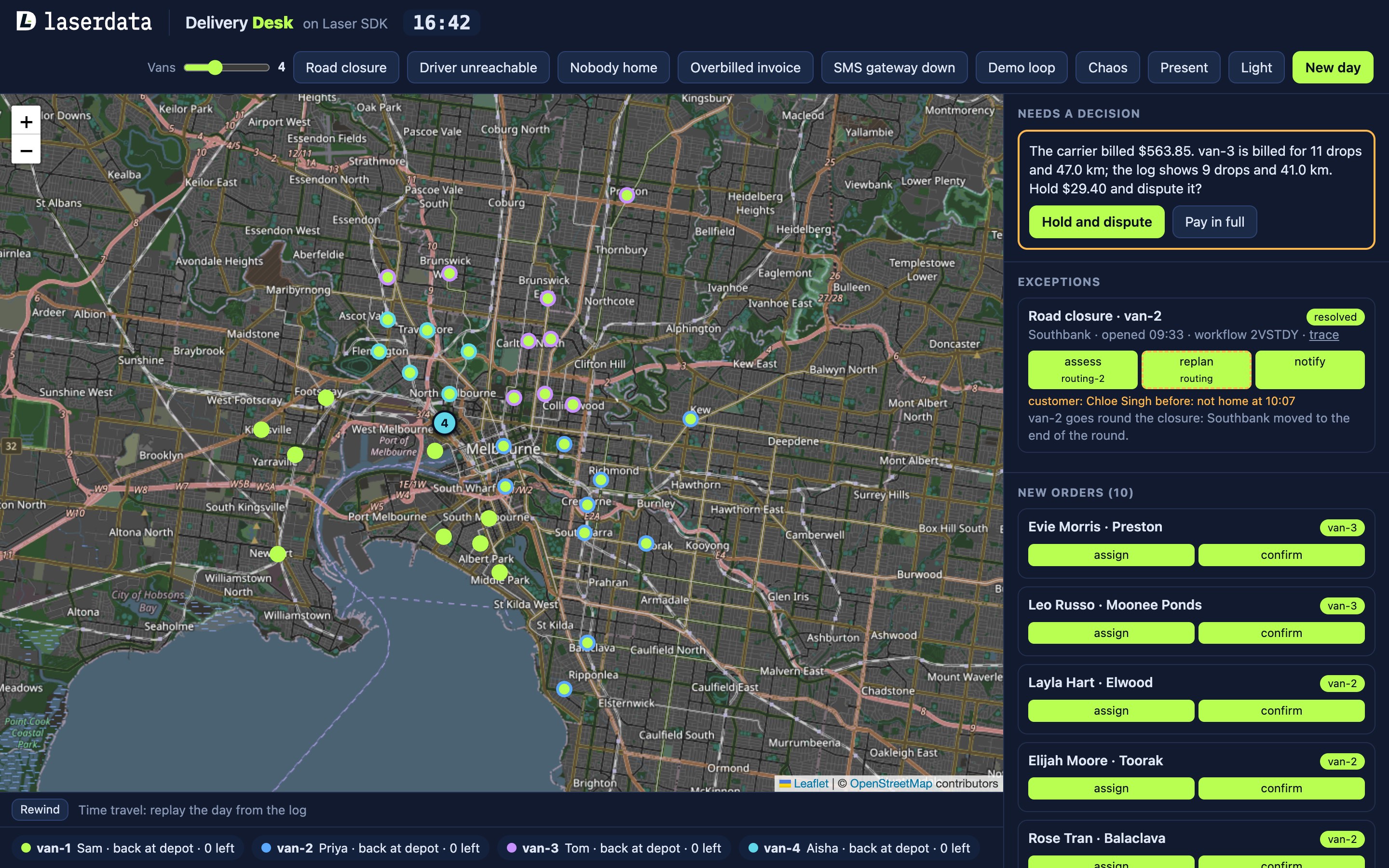
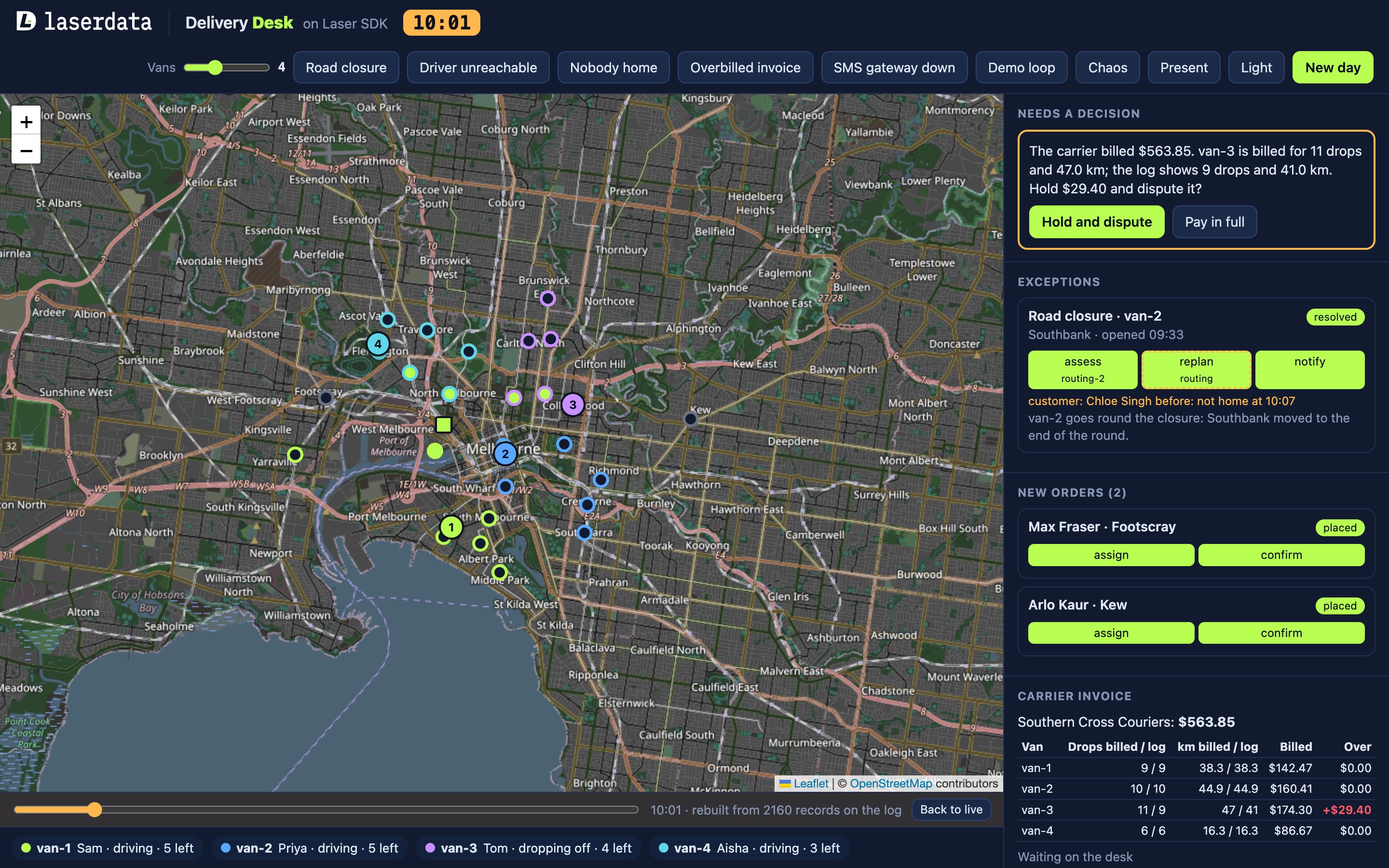
Four vans drive their rounds on a map of inner Melbourne, and a slider changes the number of vans from two to eight. Each van starts the day with six drops, and customers order more during the day. The header lists the incidents you can trigger:
- Road closure: a van stops, and its round is replanned so the blocked drop comes last.
- Driver unreachable: a van stops answering, so it is parked and its drops move to another van.
- Nobody home: a drop fails, and the parcel stays on the van for a second try at the end of its round.
- SMS gateway down: the next customer message fails, and once its retries run out it waits on the desk until you fix the gateway and send it again.
- Overbilled invoice: the vans are run by a carrier, a courier company that bills the desk at the end of the day for each drop, each failed drop and each kilometre driven. This incident makes the carrier's bill charge for two more drops and 6 km more on one van than actually happened, as a billing mistake would, and the invoice agent finds the gap and asks a person before disputing it.
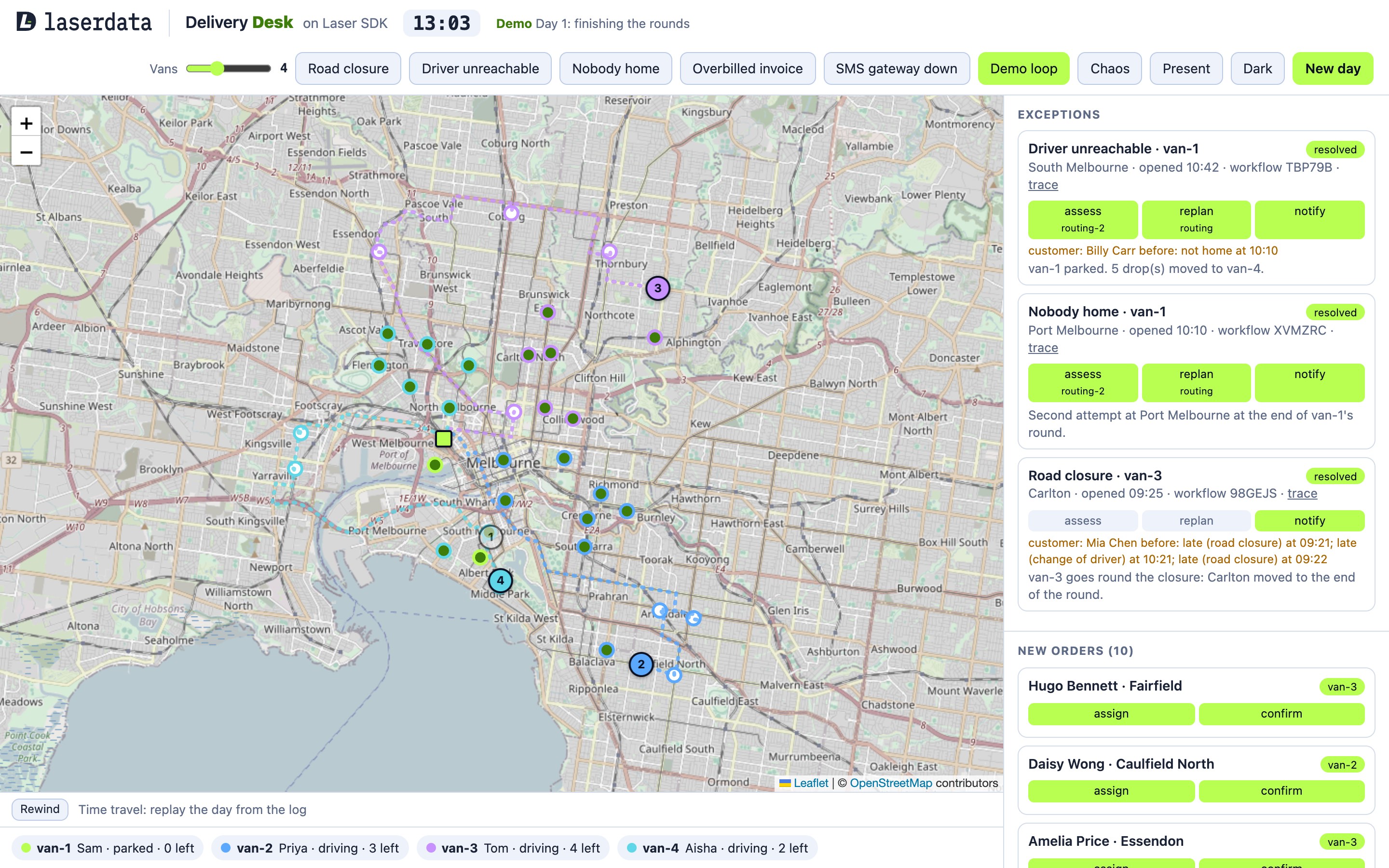
The customers, the carrier and its rates are made up, and the SMS gateway is simulated, so no text messages go to real phones: each customer message is written to the log as an event instead.
Two agents can use an LLM to write text: routing writes a one-line summary of each exception, and customer writes each message to a customer. By default the demo uses a mock that fills in fixed templates, so it runs with no model and no network calls. Set DESK_LLM=claude to have Claude Code (claude -p) write the text, or DESK_LLM=api to call the Anthropic API, which needs an ANTHROPIC_API_KEY.
The agents and the log
The demo has four agent roles, each running as its own process, and routing runs as two copies that share the routing work between them, so five agent processes run in all.
- Dispatch watches the log for problems, such as a van that has stopped or a drop that failed. It records each one as an exception, the demo's name for a delivery problem being handled (not a Python exception), and runs a workflow for each exception and each new order.
- Routing assesses an exception and replans the rounds, or adds a new order to the van that needs the least extra driving.
- Customer tells affected customers what is happening and when to expect their parcel, and keeps a record of earlier problems for each customer.
- Invoice checks the carrier's bill against the log at the end of the day, and asks a person before disputing anything.
Routing, customer and invoice are Laser SDK agents: each is started with laser.spawn_agent and listed in the agent registry with the skills it serves. Dispatch is not an agent in that sense. It is an ordinary process that watches the views and runs the workflows that send work to the agents.
The agents don't call each other. Everything they share goes through the server they all connect to, which for local development is Laser Stack. Laser Stack runs two services in Docker, named iggy and plane. The iggy service is LaserData's build of the Apache Iggy server, which the docs call Laser Streams, and it holds the durable log. The plane service is a managed backend that adds views, queries, key-value state, forks and the other features plain Apache Iggy doesn't have. LaserData Cloud provides the same features as a hosted deployment, and moving the demo between the two only changes the connection string. The demo uses three parts of it:
- The log. An append-only, durable record of messages, stored in Apache Iggy. The simulator writes each van's position to the
fleet.positionstopic, and drops, failed drops, agent steps and outcomes go tofleet.events. - Key-value state (KV). Holds the rounds, the status of each stop, the open exceptions and the result of each step.
- Queries and views. A view keeps a topic in a form you can query, such as "which vans have stopped", and each view has a change feed, so a process can follow new rows as they arrive.
The simulator is not an agent: it drives the vans, makes the drops and plays the incidents, and writes everything it does to the log.
How dispatch works
Dispatch follows both views with laser.watch. When a van stops or a drop fails, dispatch opens an exception and saves it to KV with expect_absent(), a write that only succeeds if the key doesn't exist yet. If dispatch sees the same incident again, even after a restart, the write fails, so no second exception is opened.
Dispatch then runs a workflow for the exception. For a closed road, an unreachable driver or a missed drop, the steps are assess, replan and notify, and for a new order they are assign and notify. The workflow engine records each step on the log as the run goes, and those records, the workflow's journal, are what let a restarted dispatch carry on from the right step.
Each step names a skill rather than an agent. When an agent starts, it publishes a card to the agent registry listing the skills it serves (assess, replan, assign, notify or invoice-check), and to run a step the registry finds the agents that serve its skill. Both routing processes serve the same skills, and dispatch sends each step to the one it has sent the fewest steps to, so the work is spread across them.
How resume works
When an agent is killed, the process that replaces it has to find the task the old one was working on, and then find out how much of that task was already done.
It gets the task back through redelivery. An agent marks a message as done only when it has finished handling it, so the message a killed agent was working on is never marked done, and the log delivers it again to the next process.
It finds out how much was done from KV. Each step writes its result to KV, keyed by the exception id and the step name, so before doing a step routing checks for a saved result and, if there is one, returns it instead of doing the work again. A replan changes several things at once, so routing saves the whole plan to KV before applying any of it.
The customer and invoice agents use the same check. Once the customer agent has sent the messages for an exception, it saves them in KV under the exception's id, so if the notify step is delivered again it answers with the saved messages. The invoice agent saves its finished check the same way and returns it if the check is asked for again.
Laser SDK provides the log, redelivery, KV and the workflow journal, and the app decides what to save and makes each write safe to repeat.
Killing routing during a replan
When a road closes, dispatch sends the replan step to one of the routing agents. Routing works out the new rounds, saves them, and then applies them:
plan_key = f"{exc['id']}:plan"
saved = await get_json(f.results, plan_key)
if saved is None:
    saved = await self.work_out(exc)
    await put_json(f.results, plan_key, saved)
    await f.event("checkpoint", van=van, incident=exc["id"], step="replan",
                  text="new rounds saved to KV before applying them")
else:
    await f.event("replay", van=van, incident=exc["id"], step="replan",
                  text="found the saved plan, applying it")
Saving and applying a plan takes a fraction of a second, which is too quick to kill by hand. The DESK_STEP_PAUSE setting makes routing wait a few seconds after saving the plan and before applying it, and while it waits, the exception card shows which routing agent has the step.
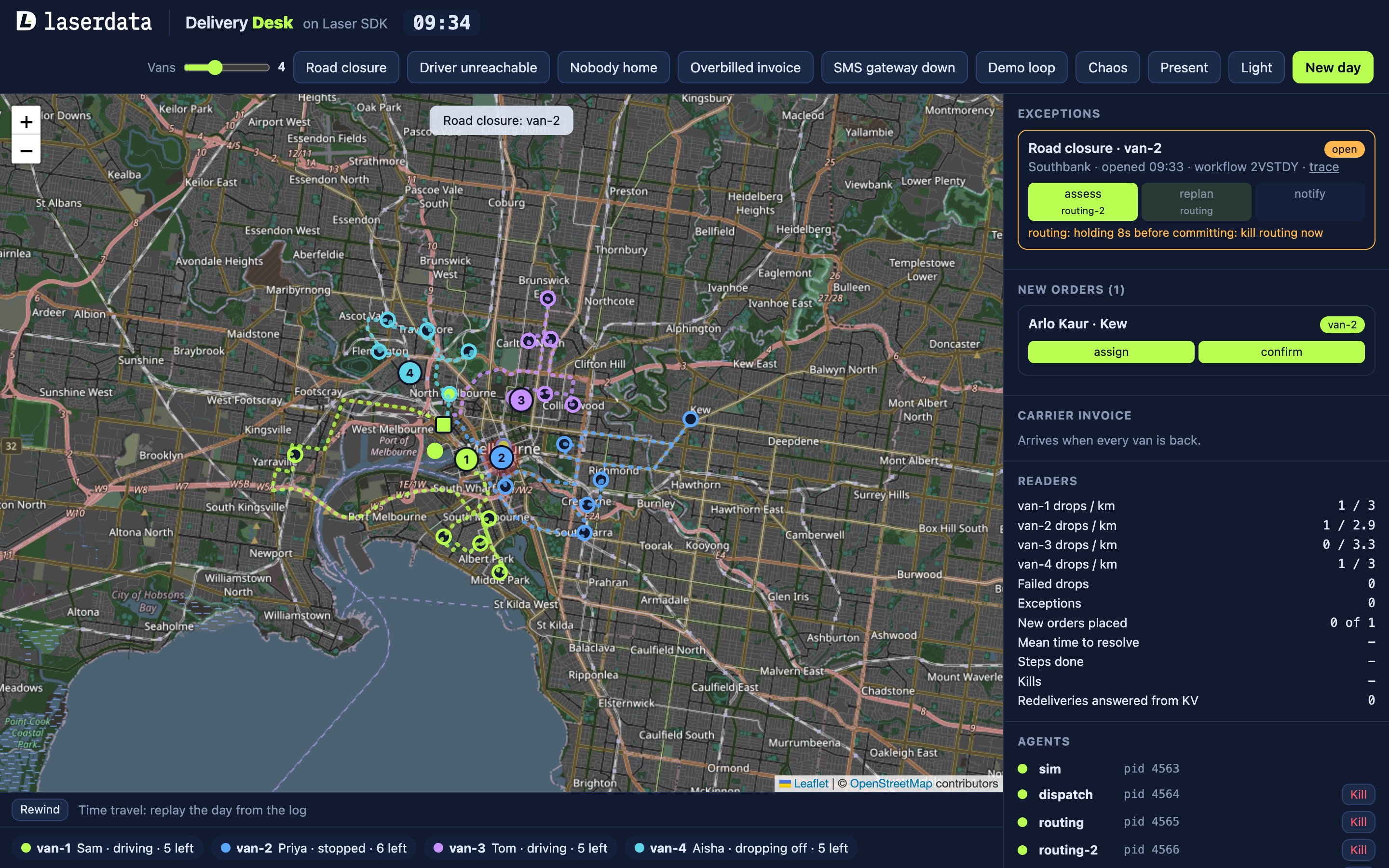
Each agent has a Kill button in the Agents panel, which sends the process SIGKILL, so it stops straight away without finishing or tidying up, as it would in a crash. The demo's supervisor, which starts all the agent processes, sees that one has died and starts a new one in its place.
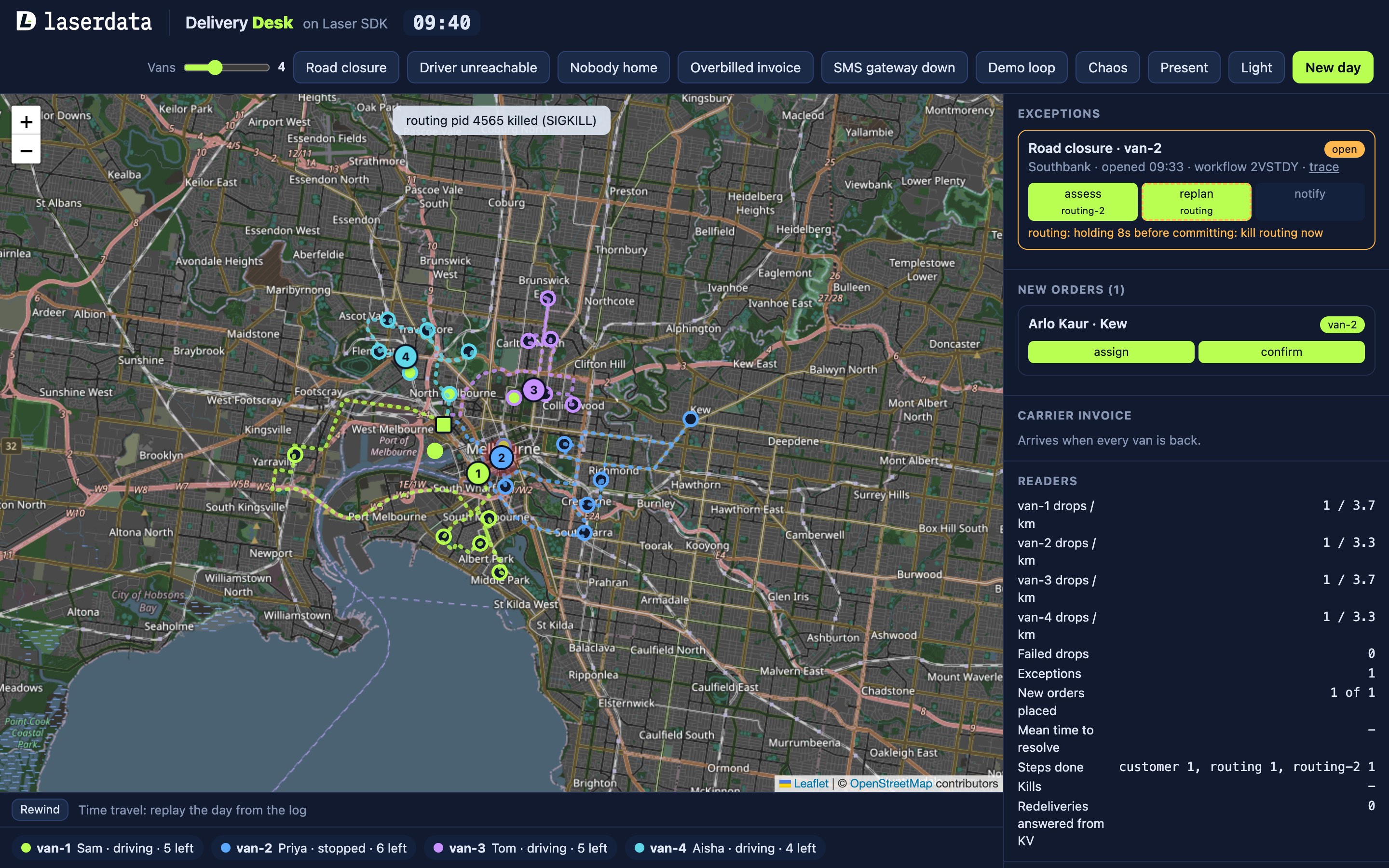
In the run shown here, routing was killed while it held the replan. These are the main log lines for that exception:
checkpoint routing replan | new rounds saved to KV before applying them
holding routing replan | holding 8s before committing: kill routing now
killed routing | routing pid 4565 killed (SIGKILL)
agent_up routing | routing up (pid 4598, LLM mock)
replay routing replan | found the saved plan, applying it
step routing replan done | van-2 goes round the closure: Southbank moved to the end of the round.
The new process found the saved plan and applied it without working it out again. Each step completed once, every parcel was delivered once, and the demo's end-of-day check that every kill was recovered passed.
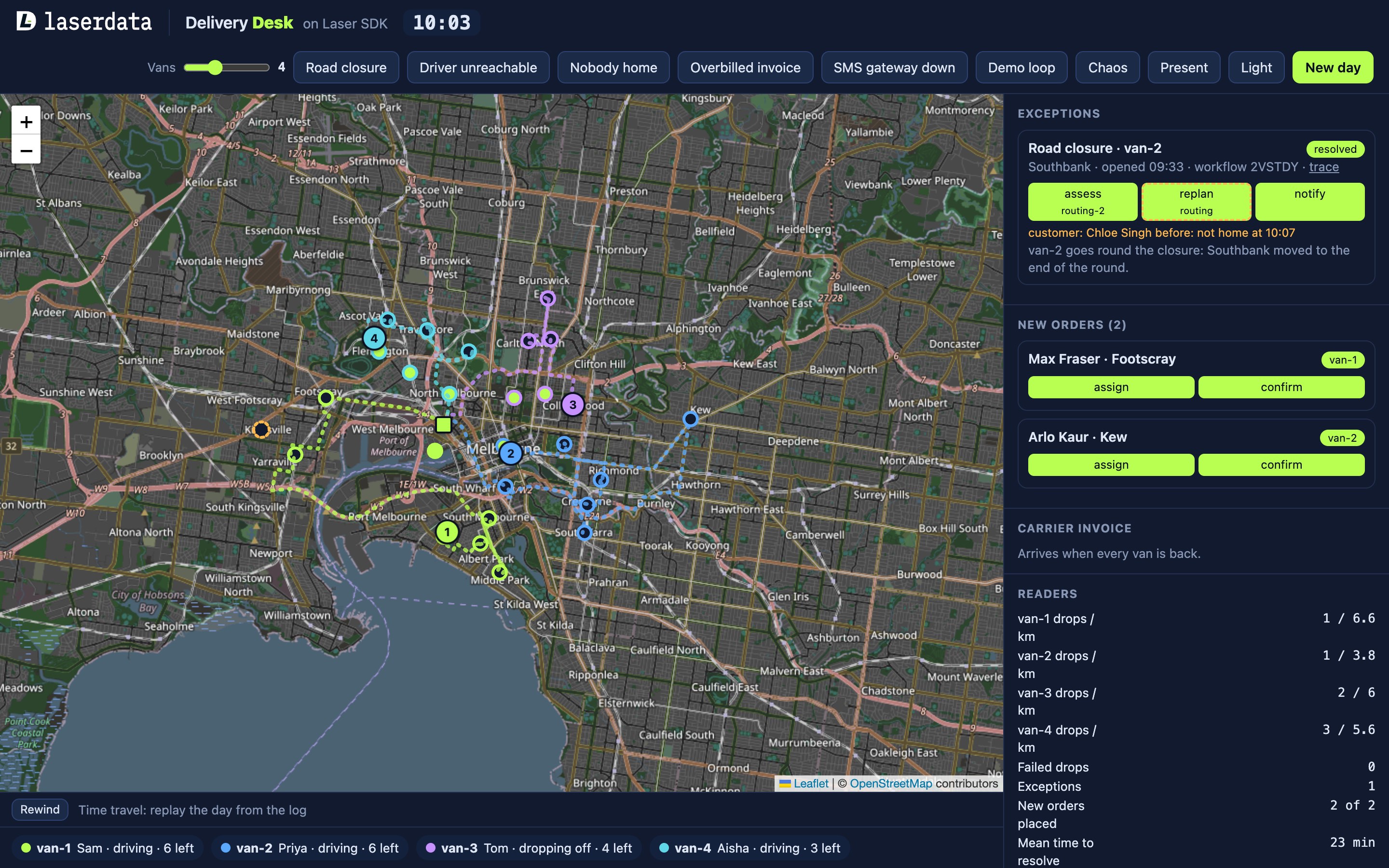
While one routing agent applies a replan, the other may be adding a new order to the same van, and both write that van's round in KV. Routing writes rounds with compare-and-swap, so a write only goes through if the round hasn't changed since routing read it. If it has, routing reads the round again and applies its change on top, so the new order stays on the van instead of being overwritten by the replan.
Killing dispatch
When dispatch starts, it looks in KV for open exceptions and resumes each workflow under its original run id:
for exc in (await scan_json(f.exceptions)).values():
    if exc.get("state") == "open":
        await f.event("resume", van=exc["van"], incident=exc["id"],
                      text=f"resuming workflow {exc['run'][-6:]} from its journal")
        self.start(exc)
wf = self.laser.workflow("dispatch", fixed_inbox=C.INBOX)
wf.run_id(exc["run"]) # the same id resumes the same run from its journalPassing an earlier run id to run_id tells the workflow engine to replay that run's journal, skipping the steps it records as complete and sending out only the ones that didn't finish.
Running it
You need Python 3.11 or later and Docker. Clone laserdata/laser-delivery-desk, then start Laser Stack from the project directory:
docker compose up -dThis starts Laser Stack from the published images. Wait until docker compose ps shows iggy and plane as healthy, then install and run the server:
python3 -m venv .venv && . .venv/bin/activate
pip install -e .
python -m fleet.server
Open http://localhost:8000. To try a kill, start the server with DESK_STEP_PAUSE=8 so routing holds for eight seconds before committing a new round. Pick Road closure, then click Kill on the routing agent that is holding, or on dispatch.
To run against LaserData Cloud instead of Docker, set LASER_CONNECTION_STRING to your deployment; the README lists this and the other settings.
Planning the rounds
The route planning is in fleet/plan.py, and it works from road distances, which are covered in the next section.
Starting rounds. The demo has 60 customer stops around the depot in West Melbourne. At the start of the day it sorts them by compass bearing from the depot and cuts that list into one slice per van, so each van gets its own part of the city. Each van takes the six stops in its slice nearest the depot and visits them nearest first, and the other stops are the customers who order during the day.
New orders. For each van, routing works out the cheapest place to fit the new stop into its round, measured as the extra metres driven, including the drive back to the depot. Each drop the van already has adds 1.5 km to the cost, so a busy van is less likely to get the order, which goes to the van with the lowest total.
Road closure. The van does the rest of its round first, nearest stop next, and comes back to the blocked drop last.
Nobody home. The failed drop moves to the end of the round for a second attempt.
Driver unreachable. The van is taken off the road and its remaining drops go to one other van. To pick that van, routing scores each van still driving as its distance in kilometres from the stopped van plus 2 km for every stop it still has to make, and chooses the lowest score, so a nearby van with few drops left wins. The handed-over drops are then added to that van's round, and the whole round is reordered nearest stop first.
Arrival times assume 3 minutes per kilometre of inner-city driving and 4 minutes at each drop, on the demo's clock, and customers are given a one-hour window starting on the half hour.
The roads and the map
The vans follow real roads. The road between every pair of places (the depot and the 60 stops) is saved in fleet/data/roads.json, which holds 3,660 one-way legs.
The file was made once by scripts/fetch_roads.py, which asks the public OSRM demo router for driving routes over OpenStreetMap data. Each leg's points are simplified with the Douglas-Peucker algorithm to within 4 metres of the road, which keeps the shape at a fraction of the size. The demo reads the file and calls no routing service when it runs.
The simulator moves each van 120 metres along its road every half second. The map in the browser uses Leaflet, a JavaScript map library, with map tiles from OpenStreetMap. The server reads van positions from fleet.positions and pushes them to the browser over a websocket.
The Laser SDK features it uses
Killing and resuming an agent uses the log, KV, workflows and the agent registry. The demo uses more of Laser SDK than that, and this table lists every feature it uses:
| Feature | What the demo uses it for | Docs |
|---|---|---|
| Log | Van positions on fleet.positions; drops, failed drops, agent steps and outcomes on fleet.events | Messages |
| Views and change feed | Dispatch follows two queryable views of the log with laser.watch | Queries and views, Changes |
| Queries | The invoice check, the Readers panel and the evals count drops and kilometres per van | Queries and views |
| KV | Rounds, stop status, exceptions and each step's result, with compare-and-swap and write-if-absent | Key-value state |
| Agents | Routing, customer and invoice, each started with laser.spawn_agent, with retries | Agents |
| Agent registry | Each step names a skill, and the registry finds the agents that serve it | Agents in depth |
| Quarantine | Takes an agent out of routing from the desk, and puts it back | Agents in depth |
| Workflows | One laser.workflow("dispatch") run per exception or order, resumed from its journal | Agents in depth |
| Contracts | Dispatch sends the invoice check to whichever agent serves invoice-check, with a deadline | Agents |
| Approval gate | The invoice agent waits for a person before disputing a bill | Agents in depth |
| Dead letters and redrive | A customer message that keeps failing is parked, then sent again once the gateway is fixed | Agents in depth |
| Forks | The invoice agent tests the carrier's version of the day on a copy of the views | Key-value state in depth |
| Memory | The customer agent remembers each customer's earlier problems across days | Memory |
| Replay | Rewind reads both topics from the start to rebuild the day | Messages |
The other features
Starting agents and retries. Each agent process calls laser.spawn_agent with the skills it serves, which go on its card in the registry, a handler for its messages, and a retry policy. If the handler raises an error, the SDK tries the message again a few times.
Quarantine. Quarantining an agent stops new work going to it while leaving the process running, which you might do if one copy of an agent starts giving bad results. In the demo, each agent has a Quarantine button in the Agent registry panel in the browser. The button calls laser.quarantine, which records in the registry that the agent is quarantined, and because dispatch picks agents through the registry, it sends new steps only to the agents still in service, with no change to dispatch's code. Reinstate calls laser.unquarantine, and the agent gets work again. The desk won't quarantine an agent that is the only one serving a skill, since those steps would then have no agent to run them.
Dead letters and redrive. SMS gateway down makes the next notify step fail. The customer agent retries it, and when the retries run out the SDK gives up on the message and calls the agent's dead_letter hook. The hook parks the message in KV, where the desk shows it. Fix and redrive clears the fault and calls laser.redrive_dead_letter, which puts the original message back on the log, and the customer agent handles it again.
Contracts. A contract sends one request to one agent and waits for a single answer: the agent finished it, it failed, no agent picked it up, or the deadline passed. At the end of the day dispatch uses one to ask for the invoice check, with laser.contract("invoice-check", ...). The request is addressed to the invoice-check skill rather than to the invoice agent by name, and the registry works out which agent receives it.
Forks. A fork is a separate copy of the views that you can add rows to and query without changing the real views. It stores only the rows you add, and everything else comes from the real views. The invoice agent uses one to show exactly what a carrier's bill is charging for. With the overbilled invoice, the bill charges for two drops and 6 km more on one van than the log shows. The agent creates a fork with laser.fork, adds those drops and kilometres to it as rows with put_row, and runs its usual drop and kilometre totals against the fork with query(...).fork(id). If the fork's totals now match the bill, the added rows are exactly the work the carrier charged for that the log has no record of. Once the desk has approved or declined the dispute, the agent deletes the fork with squash, so those rows never reach the real views.
Approval gate. Before disputing a bill, the invoice agent calls ctx.approval_gate with a prompt that names the van, what the carrier billed, what the log shows, and the amount to hold. The SDK publishes the prompt to a topic for human input, and the handler waits until a person approves or declines on the desk in the browser. The decision comes back to the agent as a reply on the log.
Memory. The customer agent remembers every delay and missed drop for each customer on a memory topic, in a stream of its own that a new day doesn't reset. When the same customer is affected again, on any day, the agent recalls their history and adds a line to the message, such as "Sorry, this is the second time we've been late to you, and we've flagged it." The same incident always produces the same memory record, so remembering it again after a redelivery doesn't add a duplicate.
Replay. Rewind, under the map, shows the day as it was at any minute, built only from the log. For each of the two topics it opens a new cursor with laser.topic(...).replay(), which starts at the first record, and polls it until it has read every record, using nothing from KV or the server's memory. It then groups the van positions by minute on the demo's clock, keeping each van's last position in that minute, and tags every event with the minute it happened in. The browser gets one frame per minute, and dragging the slider shows where each van was, which drops had been made and what the agents were doing at that point.
Queries. The views are tables that Laser Stack keeps up to date from the topics. At startup the demo registers two of them by naming the fields to take from each JSON record: fleet_events has a row per event with its van, stop, kind, agent, step and state, and fleet_positions has a row per position report with the van, its status and the metres it has driven so far. Queries on a view are built from calls such as where_eq, count, max and group_by. This one counts the delivered drops for each van:
rows = await laser.query("fleet_events").where_eq("kind", "delivered").count().group_by(["van"]).fetch()The kilometres for each van come from the highest metres value it has reported, using max instead of count. The invoice agent checks the carrier's bill against totals like these. The Readers panel in the browser uses the same kind of query to show drops and kilometres per van, steps per agent, kills and replays, and one of the end-of-day checks counts deliveries per stop to make sure no parcel was delivered twice.
The code and the README are at laserdata/laser-delivery-desk, and Laser SDK is at laserdata/laser-sdk, with its docs at docs.laserdata.com/laser-sdk.