
Spend policy, approvals and sagas in a travel desk demo
How a Laser SDK travel desk gathers quotes, checks spend policy, asks two people to approve, books as a saga, stops a stalled clerk from taking a second room, and every Laser SDK feature the demo uses.

The travel desk is a demo app built on Laser SDK 0.8.2 for TypeScript. It runs a small corporate travel desk. The desk asks airlines and hotels for prices and checks each trip against a spend policy, and a trip that costs too much needs a manager and finance to approve it. The flight, hotel and car hire are then booked in a way that cancels what was already booked if a later step fails. The code is on GitHub at laserdata/laser-travel-desk, and the Laser SDK docs cover each feature it uses.
The support desk and delivery desk demos were about agents that survive a crash. The travel desk is about rules that have to hold when something goes wrong. A supplier can be too slow to quote, or a room can cost more than the nightly limit allows, and some trips cost enough that two people have to agree to them. Later on, the car hire firm can turn down a booking after the flight and hotel are paid for, or a hotel clerk can stall part way through taking a room. This post covers how the desk handles each of those, what you see when you try them, and how to run it, and then how the prices are made up and the other Laser SDK features the demo uses.
The demo
You pick a traveller, a departure city, a destination, a date, the number of nights and a cabin, and press Get quotes. The desk asks every airline and every hotel in the destination for a price at the same time and lists the ones that answer in time, along with the car hire quote. You choose a flight and a room and press Book this trip. A policy check runs before anything is written, a trip over the approval limit waits for a manager and finance to vote, and the desk then books the flight, the hotel and the car.
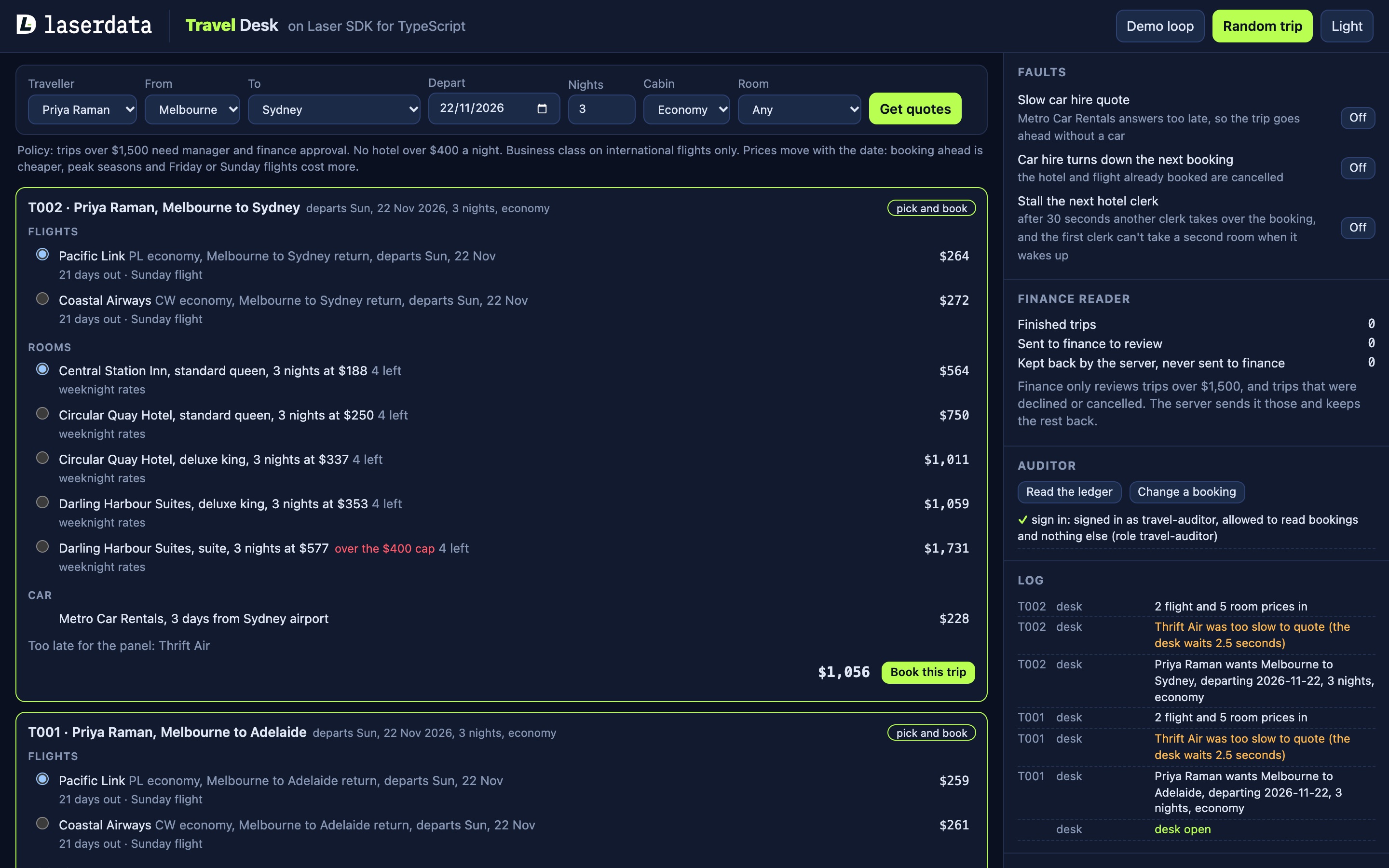
The suppliers are made up: three airlines, three hotels in each of seven cities (five in Australia, plus Auckland and Singapore), and one car hire firm. The panel on the right has switches that make things go wrong on purpose, each explained below:
- Slow car hire quote: the car hire firm answers after the deadline, so the trip goes ahead without a car.
- Car hire turns down the next booking: the car step fails after the flight and hotel are booked, so both are cancelled.
- Stall the next hotel clerk: the hotel holds the next booking past its deadline, so another clerk takes over and the first clerk can't take a second room when it wakes up.
The same panel shows what the finance reader has received and has two buttons for the auditor, and the log underneath lists every step the desk and the suppliers take.
The suppliers and the log
Each airline, hotel and the car hire firm is a Laser SDK agent with its own connection, and each one lists the skill it quotes for in the agent registry. An airline serves quote-flight, a hotel serves quote-hotel/<city> (such as quote-hotel/sydney), and the car hire firm serves quote-car. When the desk wants prices it asks for a skill, not a supplier, and the registry says who serves it. Bookings and cancellations are different: once the traveller has chosen, they go to that one supplier by its ID. Each supplier lists its skills when it is built:
const agent = Agent.builder()
  .id(AgentId.new(id))
  .listenOn(AgentTopic.Sessions)
  .respondOn(AgentTopic.Sessions)
  .capabilities(skills.map((skillId) => ({ skillId, health: HEALTHY })))
The desk and the suppliers don't call each other directly. Everything goes through the server they all connect to, which for local development is Laser Stack. Laser Stack runs two services in Docker: Laser Streams, which is LaserData's build of the Apache Iggy server and holds the durable log, and a managed backend that adds key-value state, filters, managed permissions and the other features plain Apache Iggy doesn't have. LaserData Cloud provides the same features as a hosted deployment, and moving the demo between the two only changes the connection string.
The desk keeps one stream, travel-desk, with a topic for each kind of record: proposals for the trips the desk wants to book, votes for approvals, and ledger for every finished trip. Key-value state holds the rooms each hotel has left and every booking by its reference.
Gathering quotes
To get prices, the desk uses scatter, which sends one request to every agent that serves a skill and returns the replies of those that answered before a deadline:
const panel = <T>(skill: string): Promise<T[]> =>
  this.laser
    .scatter(DESK, capabilitySelector(skill, { kind: "any" }), jsonBytes(request), FIXED_INBOX, settings.quoteDeadlineMs)
    .then((bodies) => bodies.map((body) => parseJson<T>(body)))
The deadline is 2.5 seconds by default, and the flight panel and the hotel panel run at the same time. A supplier that misses the deadline is left out of that panel rather than holding the trip up. Thrift Air, the cheapest airline, takes between 1.5 and 4 seconds to quote, so it often misses the panel, and the page lists it under "Too late". If no flight or no room arrives in time, the trip fails with a note that says so.
The car hire firm is not part of a panel, because there is only one. The desk asks it with a contract, which sends one request to one agent that serves the skill and waits for a single outcome:
const car = this.laser
  .contract(routeToCapable("quote-car", { kind: "any" }))
  .from(DESK)
  .payload(jsonBytes(request))
  .inboxRoute(FIXED_INBOX)
  .deadline(settings.carDeadlineMs)
  .send()
The outcome says whether the agent completed the request, failed it, never picked it up, or ran out of time. The car deadline is 2 seconds by default, and if the contract doesn't complete, the desk marks the car step as skipped and the trip goes ahead without a car. The Slow car hire quote switch makes the car hire firm take longer than the deadline, so you can watch that happen.
Checking spend policy
Spend policy is checked by an action governor, a function the SDK calls before a governed action is written. The desk has two connections, and only one of them, the booker, publishes proposals. The booker is the connection with the governor, in enforce mode, so every proposal it publishes is checked before it reaches the proposals topic:
const booker = await Laser.builder()
  .connectionString(settings.connection)
  .stream(settings.stream)
  .governor(travelPolicy, GovernorMode.Enforce)
  .connect()
A governor can allow an action, block it, or step it up, which means it needs an approval first. The travel policy checks these rules in order:
- A hotel over the nightly cap, $400 by default, is blocked, whether or not the trip is approved.
- Business class on a domestic flight is blocked.
- A proposal that carries an approval is allowed only if that approval is for this exact trip.
- A trip over $1,500 by default is stepped up.
- Anything else is allowed.
Each rule returns an ActionDecision, for example ActionDecision.block("business class is for international flights only") or a step-up with the reason the trip is over the limit. The desk learns the result on the publish itself: a block comes back as a PolicyBlockedError and a step-up as a StepUpRequiredError, and in both cases nothing is written to the topic. The errors don't carry the governor's reason, so the governor keeps its reason for each trip and the desk reads it from there to show on the page.
Ask for business class from Melbourne to Sydney and the governor blocks the trip with "business class is for international flights only". Choose the suite at Darling Harbour Suites in Sydney, which the page already marks as over the cap, and the governor blocks that too.
Approving expensive trips
A trip over the limit becomes an approval request that the manager and finance must both vote on. Laser SDK records approvals as typed Intent, Vote and Decision records. The intent's body is the exact proposal, and both voters are mandatory:
const intent = new Intent({
  conversation,
  proposer: BOOKER,
  body: proposalBytes(proposal),
  eligibleVoters: [MANAGER, FINANCE],
  mandatoryVoters: [MANAGER, FINANCE],
  policy: { kind: "all" },
  policyVersion: policy.version,
  deadlineMicros: BigInt(Date.now() + settings.voteWindowMs) * 1000n
})
intent.validate()
The vote stays open for 10 minutes by default. Each Approve or Decline button on the page casts a vote with Vote.cast(intent, voter, choice), and the desk folds the votes into a decision with decide(intent, ballots, now). The intent, each vote and the decision are published to the votes topic, so the approval is on the log alongside the trip.
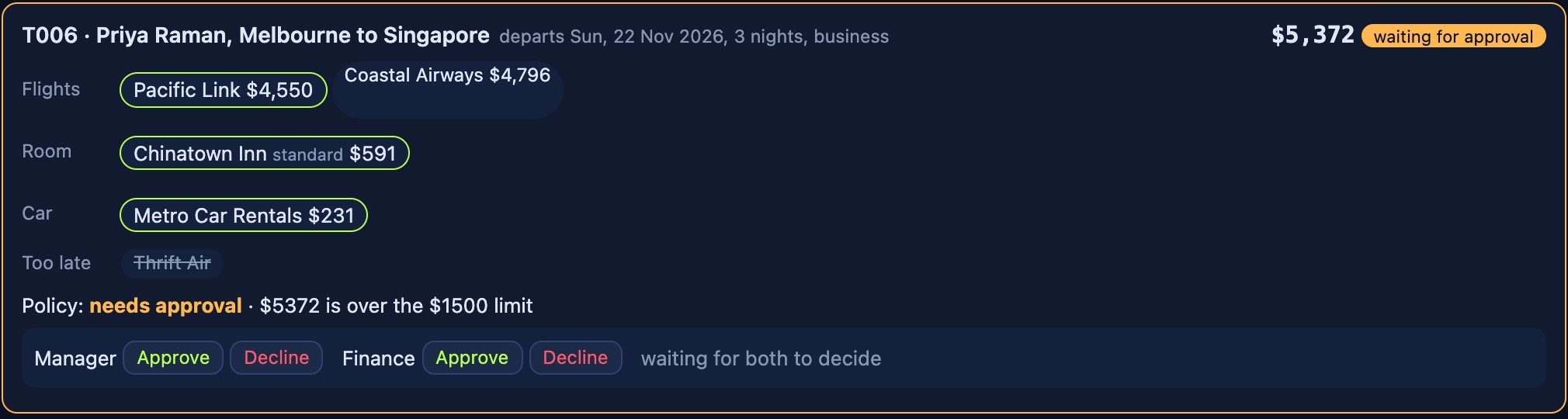
Once both have approved, the desk publishes the proposal again with the intent attached. This time the governor lets it through, but only if the decision authorises that intent and the intent was raised for exactly these proposal bytes:
if (!decision.authorizes(intent)) return false
const body = new TextDecoder().decode(intent.body)
return body === JSON.stringify(proposal)
Because of this check, an approval can't be reused for a different trip. Change the total by a dollar and the bytes no longer match, so the governor blocks it. If either voter declines, the trip is declined and nothing is booked. The Singapore trip in the screenshot was approved by both and then booked.
The desk keeps open intents and their votes in memory, so although every vote and decision is on the topic, a restart of the desk loses a vote that is still in progress.
Booking as a saga
Once a trip is allowed, the desk books it with a workflow, a run of steps that the SDK sends to agents and records as it goes. Each step goes to the supplier the traveller chose, and each has a verifier that checks the reply and a compensation that undoes the step:
let workflow = this.laser
  .workflow("trip")
  .inboxRoute(FIXED_INBOX)
  .runId(run)
  .budget(WorkflowBudget.unlimited().wallClock(120_000))
  .step("flight", routeTo(AgentId.new(p.flight.supplier)), book("flight", { cabin: p.cabin as Cabin }))
  .verifyWith(verify("flight"))
  .compensateWith(cancel("flight"))
  .step("hotel", routeTo(AgentId.new(p.hotel.supplier)), book("hotel", roomExtra))
  .after("flight")
  .exclusiveIn(FENCE_NAMESPACE)
  .onTimeout("reassign")
  .verifyWith(verify("hotel"))
  .compensateWith(cancel("hotel", roomExtra))
The car step is added only if the trip has a car, and the whole run has a 120 second wall clock budget. This is a saga: the verifier accepts a step only if the supplier answered ok with a booking reference, and if a step fails, the engine runs the compensations of the steps that already finished, newest first. The step that failed has no booking to undo, so it isn't compensated.
Turn on Car hire turns down the next booking and book a trip. The car hire firm refuses with "no cars left", and the car step fails its check. The engine cancels the hotel booking and then the airline ticket, and the desk marks the trip cancelled and writes it to the ledger.
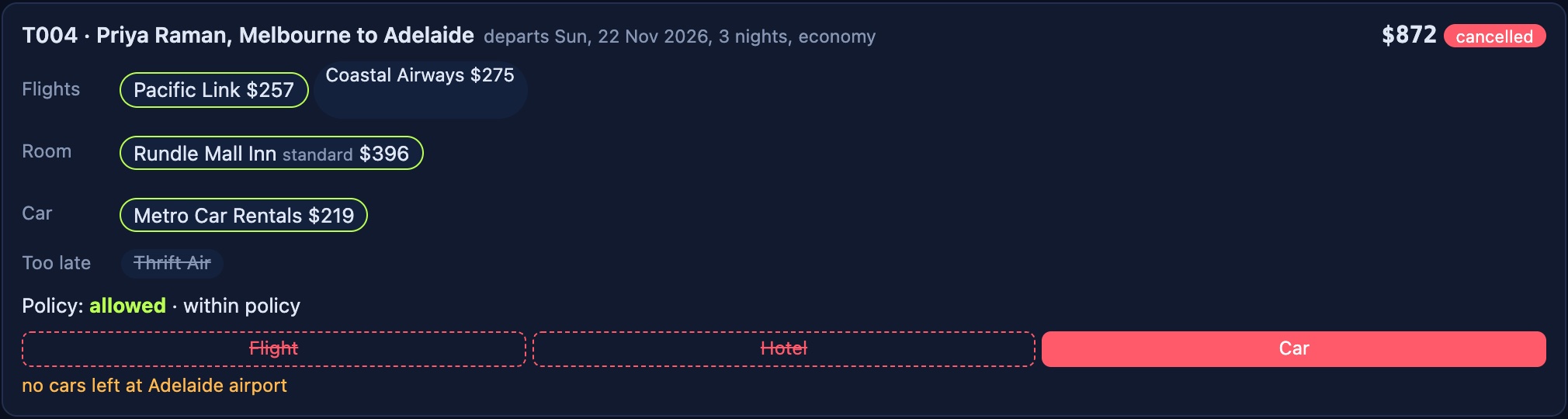
Cancelling is a request like any other. The hotel adds the room back with a compare-and-set write that retries if another write got in first, and the airline takes one off the number of seats sold on that flight.
A stalled hotel clerk
Two agents could end up doing the same hotel booking. If a clerk stalls part way through taking a room, the step times out and the booking goes to another clerk, but the first clerk might still wake up and take a second room. Two lines in the workflow prevent that, .exclusiveIn(FENCE_NAMESPACE) and .onTimeout("reassign").
An exclusive step holds a fenced lease while it runs, which is an ownership grant with a token that goes up each time the lease is taken. The engine sends the request with the lease's token. If the step times out, the engine releases the lease, takes it again with a higher token, and sends the request to a fresh holder, at most twice, so there are three attempts in all. The hotel only takes a room with a write that carries the current token:
await rooms
  .casFenced(key, FENCE_NAMESPACE, utf8(run.toString()), token)
  .expectVersion(entry.version)
  .json({ left: left - 1 })
  .commit()
If the token is stale, the server refuses the write as a lost lease, and the hotel doesn't take the room.
The Stall the next hotel clerk switch holds the next hotel booking for 33 seconds, past the 30 second step deadline. In the run for this post, the clerk at Fortitude Valley Inn stalled on attempt 1, the engine reassigned the step, and attempt 2 held the room. When the first clerk woke up, its write carried the old token and was refused, so one room was taken, not two.
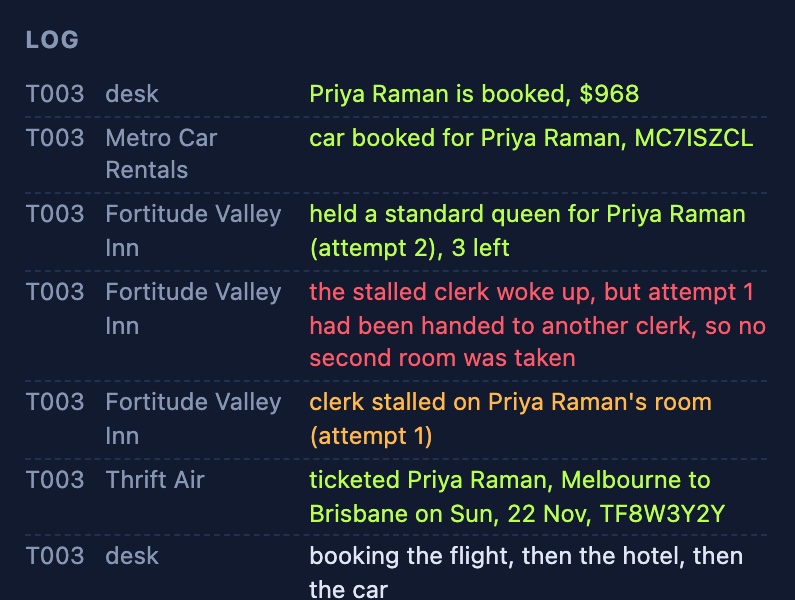
Each agent handles one request at a time, so while a clerk is stalled, that hotel also misses quotes for other trips.
Running it
You need Node 22.14 or later and Docker. Clone laserdata/laser-travel-desk, then start Laser Stack from the project directory:
docker compose up -dThis starts Laser Stack from its published images. Once both services are healthy, install and start the desk:
npm install
npm start
Open http://127.0.0.1:8010, press Get quotes with the defaults, and then Book this trip. To try the cases above, ask for business class from Melbourne to Sydney, pick the suite, ask for business class to Singapore for the vote, and use the switches for the car hire firm and the hotel clerk. Use the Auditor buttons after a few bookings.
To watch it without clicking, start it with DESK_DEMO=1 npm start, which runs every scenario in turn with ordinary bookings mixed in among the ones that are blocked, need approval or are cancelled. npm test runs the policy, vote and pricing tests and needs no server. To run against LaserData Cloud instead of Docker, set LASER_CONNECTION_STRING to your deployment.
How the prices are made up
Nothing has a fixed price. The pricing is in src/pricing.ts, and each quote carries the reasons its price moved, which the page shows under the price.
A return economy fare starts from the great-circle distance between the two cities, at $50 plus 9 cents a kilometre each way. Each airline applies its own factor to that, Thrift Air's being the lowest, and business class multiplies the fare. The fare then moves with how far ahead the trip is booked, so a flight within three days costs 60% more and one more than two months ahead costs less. It also rises in peak seasons, which are the Christmas and January peak, Easter, the July and September school holidays, and the high seasons in Auckland and Singapore. Friday and Sunday flights cost more and midweek ones less, and each seat already sold on that flight adds 6%.
A hotel room starts from its base nightly rate, scaled for the city, and follows the same booking-ahead and season rules. Weeknights cost more than weekends, averaged over the nights of the stay, and the rate rises as the hotel fills. Car hire moves with booking ahead and the season. Every quote also gets a small random wobble of up to 4% either way, so two quotes for the same trip can differ.
The Laser SDK features it uses
This table lists every Laser SDK feature the demo uses:
| Feature | What the demo uses it for | Docs |
|---|---|---|
| Agents | Each airline, hotel and the car hire firm, with its own connection | Agents |
| Agent registry | Suppliers list the skills they serve, and the desk asks for a skill rather than a supplier | Agents in depth |
| Scatter | One quote request to every airline, and one to every hotel in the destination, with a deadline | Agents in depth |
| Contracts | The car hire quote, with a deadline | Agents |
| Action governor | The spend policy on the booker's connection, in enforce mode | Governance |
| Intents and votes | The manager and finance approval for trips over the limit | Governance |
| Workflows | Booking the flight, hotel and car as a saga with verifiers and compensations | Agents in depth |
| Fenced leases | The exclusive hotel step, reassigned on timeout | Key-value state in depth |
| KV | Rooms left in each hotel and every booking by reference, with compare-and-set writes | Key-value state |
| Log | Proposals, votes and the ledger on three topics | Messages |
| Consumer filters | The finance reader receives only the trips it reviews | Filters |
| Managed roles | The auditor's read-only role | Governance |
The other features
Consumer filters. Every finished trip goes on the ledger topic as one JSON record, but finance only reviews the trips that needed a vote or came apart. Its consumer group is created with a filter, which the server evaluates, so the records finance doesn't want never cross the network:
static filter(): ConsumerFilter {
  return ConsumerFilter.json(
    FilterExpr.any([
      FilterExpr.pred("total", "gt", policy.approvalOver),
      FilterExpr.pred("status", "eq", "unwound"),
      FilterExpr.pred("status", "eq", "declined")
    ])
  )
}
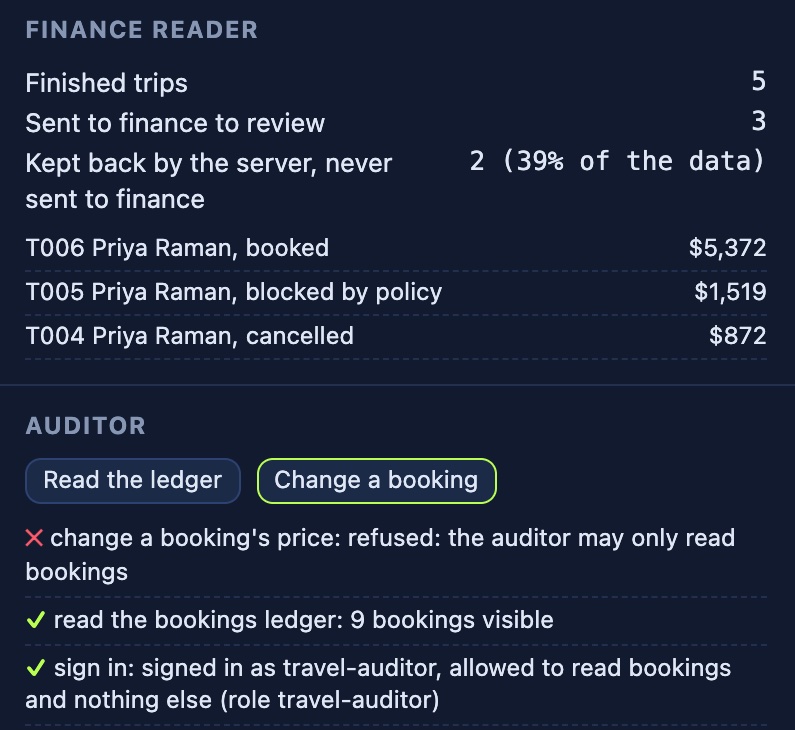
A trip reaches finance if its total is over the approval limit, or it was declined, or it was cancelled because a later booking failed. The group is created with group.create({ filter: FinanceReader.filter() }), and the reader starts at the first record. The page shows how much of the ledger the server kept back, worked out from the bytes the desk wrote and the bytes finance received. Of the five trips in these screenshots, finance received three, and the server kept back the other two, 39% of the ledger's bytes.
Managed roles. The auditor signs in as its own Iggy user, bound to a travel-auditor role that may read the bookings and nothing else. A role is a named set of grants, and the desk defines it and binds it to the auditor's user:
const grants: readonly Grant[] = [
  { effect: "allow", feature: "kv", action: "read", resource: resourcePatternLiteral(resource) },
  { effect: "deny", feature: "kv", action: "write", resource: resourcePatternAll() },
  { effect: "deny", feature: "kv", action: "delete", resource: resourcePatternAll() }
]
const role: Role = { name: ROLE, grants }
await desk.defineRole(role)
The auditor then connects as that user and calls whoami to show who it is. Read the ledger scans the bookings with laser.kv(BOOKINGS).scan(), which works, and Change a booking tries to write one, which the server refuses. Apache Iggy checks its own permissions before the managed backend sees a command, and a key-value write counts as a send, so the auditor's Iggy user has read and send on the stream and the travel-auditor role alone decides what it may do.
The code and the README, which lists every case to try, are at laserdata/laser-travel-desk, and Laser SDK is at laserdata/laser-sdk, with its docs at docs.laserdata.com/laser-sdk.